

-> HOME
how to obtain update for MBir /MBkey:
- download update utility. It is different for MBkey and MBir, so if you have both tools, you must get both update tools too.
- disconnect any 3rd party hardware from USB and attach tool, launch appropriate software. If everything is OK, serial number is displayed at the top of form like shown in picture:
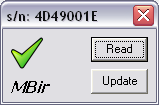
- press button Read. If everything is OK, green “check” is shown informing that data is collected.
- go to directory from where you launched update utility and find file with name like this: MBir4D49001E.req (instead of 4D49001E you will see serial number of device you have.
- send us this file by e-mail. Let us know if you need any optional software. In case if you already have some additional software purchased before, let us know!
- if everything is OK, you will get a license file from us.
- launch update utility again (disconnect any 3rd party hardware from USB before!), press Update, file load screen will open. Choose file you obtained from us, press Open
- if everything is ok, green “check” will become visible. Device is ready for updated software.
some important notes you must know and agree:
- old software will never work after update!
- don’t try to update device with update file designed for another device. Most likely nothing will happen, but anyway…